Showing posts with label Control Your Child’s Screen Time. Show all posts

Friday, 27 December 2019

Raising Tech-Savvy Kids in Digital Age: How to Limit Screen Time with Limit Screen Time App


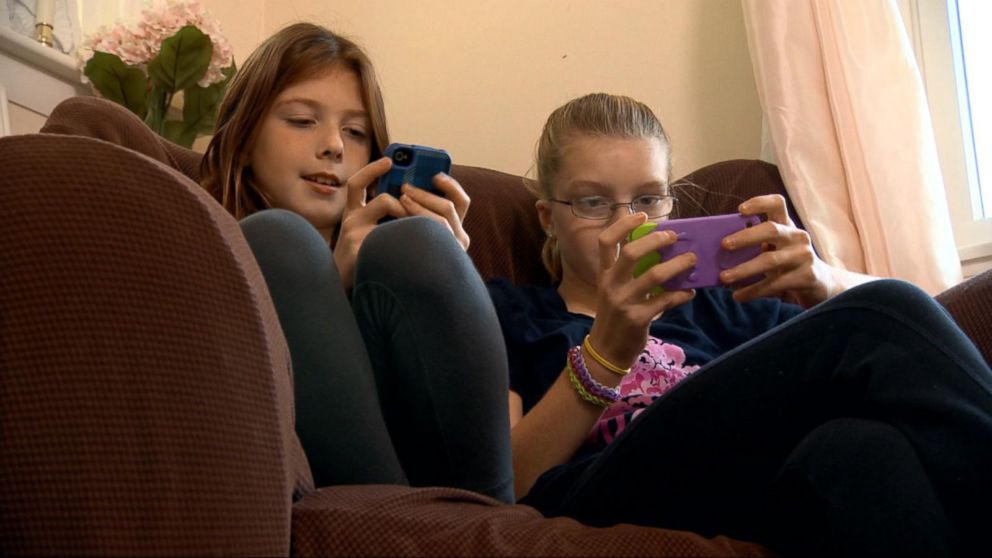
The challenges in today’s digital world are getting out of control especially, when it comes to parenting. From screen addiction to cyberbullying, every parent is worried about the safety and security of kids. 

Kids in today’s era are stringed to technology and stopping them requires a great amount of effort and time. However, it is not impossible because there are plenty of ways in which parents can get involved and keep their kids protected and safe from the threats. In this article, we are going to reveal some of the tips and tricks to raising tech-savvy kids without breaking the sweat. Let’s dive in. 

Develop Healthy Screen Time Habit

One of the most effective tips for parents is to limit screen time and not to allow children aging 5 years or under to spend more than two hours. However, they can show some flexibility when it comes to grown-up kids and teenagers, provided that the activities are healthy. 

Several types of research suggest the type of activities and content that allow parents to develop healthy screen habits. For instance, there is a difference between watching a movie alone rather than watching movie with others. When it comes to screen time, the most important thing parents should consider is to help children develop phone etiquettes and set boundaries and rules for the whole family. 

Though it is challenging to enforce the rules on kids as most of the parents are constantly strung to their own device. To set an example, parents have to practice what they teach. 

Not to Calm Children with Tech Devices  

In most of the cases, parents find devices to be quite useful especially when it comes to keeping the kids calm and relaxed. However, the problem is that what parents are teaching their kids is quite harmful. Instead of handing them a toy or a coloring book, they give the device and forget what harm it can do. 

The best approach is to involve them in some offline activities that would help them not only develop mentally but also physically. The rule is to ensure that you are playing as a good role model and teaching good behavior. For instance, allowing kids to use devices during dinner time, bedtime or homework time can cause many problems. The screen time should be kept to minimal in order to help raise a better child. 

Install Limit Screen Time App

There are plenty of ways to limit screen addiction among kids. For instance, you can involve your kids in other offline activities such as painting, playing, jogging, swimming, running and much more.
However, if you want to take complete control over your kid’s screen time, make sure to install Limit ScreenTime app like FamilyTime. The app allows you to take complete control over how your kid behaves online. Moreover, you can also enable internet filters to block inappropriate websites like porn, gambling and drugs. In addition, you can also monitor SMS and track location of kids. Placing mobile geo-fences is quite easy with FamilyTime. 

Thursday, 21 February 2019

48-HOUR CHALLENGE GAME OF FACEBOOK: STAY UPDATED ABOUT KIDS’ LOCATION WITH FAMILY LOCATOR SMART PHONE APP

48-HOUR CHALLENGE GAME OF FACEBOOK: STAY UPDATED ABOUT KIDS’ LOCATION WITH FAMILY LOCATOR SMART PHONE APP

A new Facebook viral game called the 48-hour Challenge ('48 Challenge ') invites kids to hide from their family members for as long as possible and' rewards ' them every time they mention their names on the social networks.

Those children receive points if their parents use Facebook or Twitter to sound the alarm about the disappearance of their children or write to their friends to help them find their descendants.

How can you stop them?


Kids love to follow the viral trends among their community members ignoring the consequence of their acts. If you fear them going away, the better idea is to talk to them in the first place and then install any good family locator smart phone app such as FamilyTime on their phone. Using the application, you can:

  1. See what apps are they using on their smartphone and for how long
  2. Check their SMS history and see if they are talking about the game with their friends
  3. Monitor call logs to see their dialled, received and missed calls
  4. Check their location in the real time all around the clock
  5. View their location history to see what places they have visited with the date, time and address stamps
  6. Create a virtual fence around your house to get alerts when your kid leaves the house
  7. Receive SOS alert from kids with their location details in case of emergency
  8. Block Facebook app remotely and hinder the use
  9. Schedule auto screen locks on their devices to restrict device use in the later hours
  10. Remotely lock their device anytime and from anywhere

Aren’t these feature great to keep your kid grounded at home and avoid the risks of 48 challenge? These certainly are. So, get the app now. The app is compatible with all versions of Android, iOS and Kindle devices. You can give FamilyTime app a try for free. To get the trial version, go now to the app store on your phone say Google Play or iTunes and get the app from there. You can also install FamilyTime in a jiffy from the buttons given below:

Family Locator Smart Phone App

Family Locator Smart Phone App

The trial version of the FamilyTime app gives you access to all its premium features. So, get the app now an stay connected to your 24/7.

Stay updated about your kids’ location and have peace of mind:


In the scenario, where kids are actually trying to keep their location hidden from you, it is imperative that you stay updated about their position so you can save them from all the hazards and dangers. For the purpose, the family locator smart phone is the smartest choice you can pick. Get the app now and simplify tracking. Happy parenting!

Tuesday, 3 July 2018

CURB YOUR TEEN’S GAMING ADDICTION WITH THE LIMIT SCREEN TIME APP!

CURB YOUR TEEN’S GAMING ADDICTION WITH THE LIMIT SCREEN TIME APP!

Anyone who has experienced it can tell you for sure that it really is! Playing games occasionally is harmless, but once addicted to gaming, it can become a compulsive behavior for gamers. Gamers tempted to escape reality, become so wrapped up in their games that they tend to forget everything else around them. And whenever they are deprived of their chance to play, they are likely to display annoyance, depression or even violence.

If your teens are constantly on their phones and tabs playing video games there is a high chance they might be a gaming addict. The chances are not that rare. A nationwide survey found out that, 1 out of every 12 kids, show signs of gaming addiction. Though, gaming addiction has not been recognized by the American Psychiatric Association. But this does not mean it is a false condition.

There are many self-help ways you can use to reduce this addiction in teens, one of them is limit screen time app. But first you need to observe these symptoms in your teens to make sure if they are gaming addicts or not:

Symptoms of gaming addiction:

  • Secretly playing or lying about the hours spent playing.
  • Giving up time at school to play games.
  • Depression or anxiety.
  • Alienation from friends and family
  • Becoming irritated when unable to play.
  • Sleep deprivation. 
  • Losing interest in hobbies and activities. 
  • Declining grades. 


How can limit screen time app help?


If you can clearly observe most of these symptoms in your teen, then it is time to take steps to help them overgrow this addiction. Counter technology with technology and use limit screen time app like FamilyTime to not only monitor the time spent on games but also to control it. Give this app a try for yourself and download it from your iTunes or in a jiffy from the buttons below:

Limit screen time app

limit screen time app

This app lets you reduce gaming addiction in your kids by giving you the control to:
  • View all the apps installed on your kids phone. 
  • Check the app usage frequency to see the time spent on each app. 
  • Reduce their screen time by remotely locking their phone. 
  • Blacklist any app you want. 
  • Assign specific minutes to play a game 
  • Schedule auto screen locks to manage their screen time 
  • Remotely lock their device to curb the use of the device instantly 

You can start in the same order; first see all the apps you teens use on their iPhone/tab, and then check how much time they spend on gaming apps. Remotely lock their phone from your Dashboard to lessen the addiction and if still doesn’t work, simply block the game.

Don’t Let This Addiction Consume Them!


Being a parent means taking hard decisions for your kids’ own good. You should know when to put your foot down without damaging the relationship of trust and respect between you and your kids. Screen time limit app can help you a great deal in this. Stop the gaming addiction smartly!

Monday, 6 March 2017

Risks Of Excessive Screen Time For Kids - Use Screen Limit App To Take Control

The time you spend using electronic gadgets with screens, including computers, smartphones, iPad, laptops and TV is screen time. It is an undeniable fact that screen time provides various benefits to kids these days, including informative content and entertaining stuff. But, there are risks attached to an unbalanced screen time. To maintain a healthy lifestyle, limiting screen time to your kids is probably the most effective step.


Risks Associated with Excessive Screen Time


A disproportionate screen time makes your child vulnerable to many potential dangers. When you restrict your child’s screen time, you provide your child with a chance of getting engaged in other healthy activities, reducing the risk factors attached to excessive screen use.

1. Physical Problems


Screen time can cause a few physical problems for your child such as:

  • Weak Eyesight: When your child continuously uses screens, he/she can have irritated and itchy eyes which result in a frail eyesight.
  • A headache: A constant use of screens causes a severe headache in children. This happens especially when your child spends a great amount of time while playing video games.
  • Obesity: Children who get addicted to different TV series, video games or social sites are usually found glued to screens. They ignore all the other activities including physical games and sports. This contributes to obesity to an enormous extent.
  • Fatigue: Excessive engagement of children towards screen results in lost appetite and fatigue.

2. Safety Concerns


When you allow your child to enjoy unrestricted and unlimited use of the screen, he/she is more likely to commit a digital slip-up. Safety concerns caused by screen use can be:

  • Violent and aggressive TV shows.
  • Pornographic content on the Internet.
  • Obscene Videos on YouTube.
  • Vulgar imagery on Google and on different websites.

3. Social Issues


Your child faces social issues in the following way:

  • Lack of Interest: A child addicted to screens usually feels bored while interacting with other people face to face. Your teenager may bluntly use his/her mobile device when elders are in a conversation with them.
  • Minimal Confidence: When a child gets to use screen privilege for a non-restricted period of time, he/she doesn’t feel the need of mingling with people socially and eventually lose their confidence. A constant routine of not taking part in social gatherings results in minimal confidence level in children.

Use Screen Limit App to Control Your Child’s Screen Time


Parents need to understand the severity of the risks an excessive use of the screen brings to their children. Hence, using a screen limit app for allowing a calculated screen time to kids is the wise thing to do in this digital era. There are many options available in the market in this regard, but the one most preferred by the majority of parents is FamilyTime. Install FamilyTime - screen limit app on your phone and on your kids’ device to accomplish these below-given tasks:

  1. Schedule Auto screen lock on kids’ device for as long as you want: Using FamilyTime screen limit app, you can schedule an auto lock on your child’s mobile device. Since mobile devices are the major cause of screen addiction in most teenagers. The auto lock function disables your kids’ device and enables it again when the time limit for the lock expires. By scheduling an auto lock, you can ensure a ‘screen-free’ time daily or weekly.
  2. Remotely lock their device at any time from anywhere: FamilyTime also enables parents to lock their child’s phone with a single swipe. They can lock their devices remotely too, and can gain their immediate response.

The above-given features are related to screen time limits. But this is not all that the app offers rather it provides many other valuable features that let parents monitor kids’ screen use, mirror contacts, Monitor SMS and Call logs, Watchlist Contacts, block apps, see web-history, track location and much more. Want to give this app a try, you can!. Get the app now from the app store on your phone or from buttons given below: